Intro
MicroRNG is a hardware (true) random number generator device that can be used in embedded systems as a reliable source of entropy. This quick guide explains how to use MicroRNG device in UART mode on Windows platform utilizing USB/VCOM interface. MicroRNG can generate random numbers at a rate up to 1.5 Mbps in 2-wire UART mode.
Hardware requirements
- MicroRNG device configured for 2-wire UART operation mode.
- Breakout development board with UART and USB/VCOM interfaces such as
FT232R Breakoutboard or similar. The board should be configured to support 3.3V signal levels. You may need to install an appropriate Windows VCOM driver for the board to operate. - Breadboard with connecting wires.
- USB connecting cable.
Connecting components
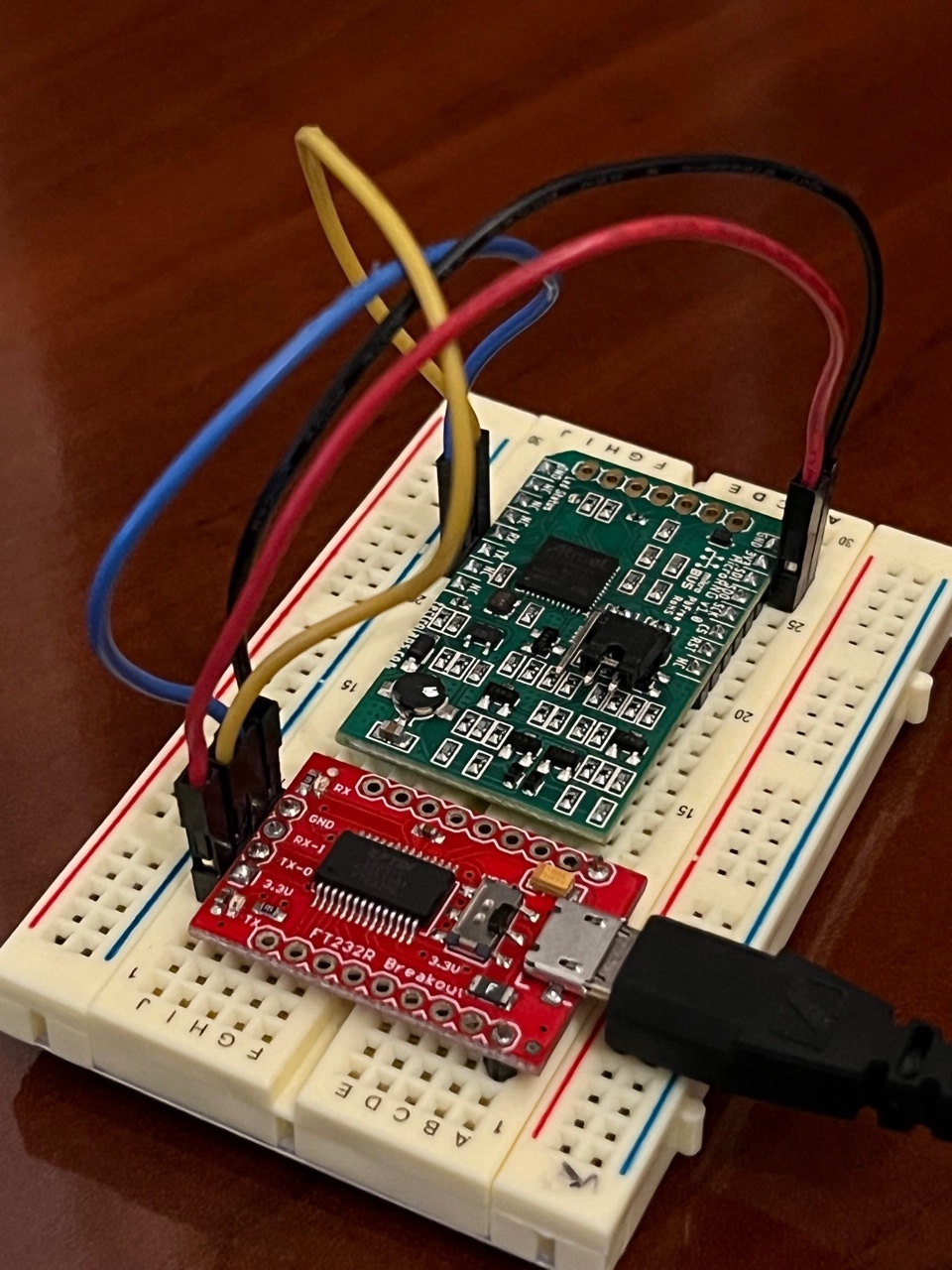
Connect components with wires as shown in the picture below (don’t forget to configure the FT232R Breakout board to operate in 3.3V level mode).
The FT232R Breakout board should be connected to Windows PC using the USB cable.
A Python sample code for retrieving 4 random bytes from MicroRNG as an integer
import serial

#
# The following Python3 sample code demonstrates how to use VCOM/USB interface in Windows for connecting to MicroRNG device using a 2-wire UART connection.
# Before running this sample code, make sure the jumper of the 'JP Mode select' switch is set to position 1-2 (2-wire UART mode).
#

# Set appropriate COM port number. Set UART speed as 19200 bps (19200 is a factory programmed default speed for the MicroRNG).
ser = serial.Serial("COM24", 19200, timeout = 1)

# Send 'U' command to MicroRNG and make sure that it won't be running in sleep mode.
ser.write(b'U')

# Read the status byte from MicroRNG
status = ser.read(1)

# The status byte value 0 indicates no errors
print("Status byte from U command: " , status)
if status != b'\x00' :
    exit()

# Send command '1' to MicroRNG and request 4 random bytes for building a random integer.
# This 3 bytes command is used to retrieve true random bytes from
# the MicroRNG device by hashing the low bias random byte
# stream with SHA-160. The command byte is followed by a 16 bit unsigned integer which represents the
# requested amount of bytes (max value is 50000), the lower byte
# is sent first and then the higher byte. The MicroRNG device
# expects to receive all three bytes within a reasonable amount of
# time. There should not be delays longer than 90 milliseconds
# between moments when sending each byte, as part of command,
# otherwise the device will ignore the command.
request = bytearray([49, 4, 0])
ser.write(request)

# Read the response from MicroRNG as 4 bytes.
b = ser.read(4)
print("Retrieved random bytes: ", b)

# The last byte in the response is the status byte.
# Read the status byte from MicroRNG
status = ser.read(1)

# The status byte value 0 indicates no errors
print("Status byte: " , status)
if status != b'\x00' :
    exit()

# Build a random integer from the retrieved bytes
int_val = int.from_bytes(b, 'little', signed=False)
print("Random integer: ", int_val)